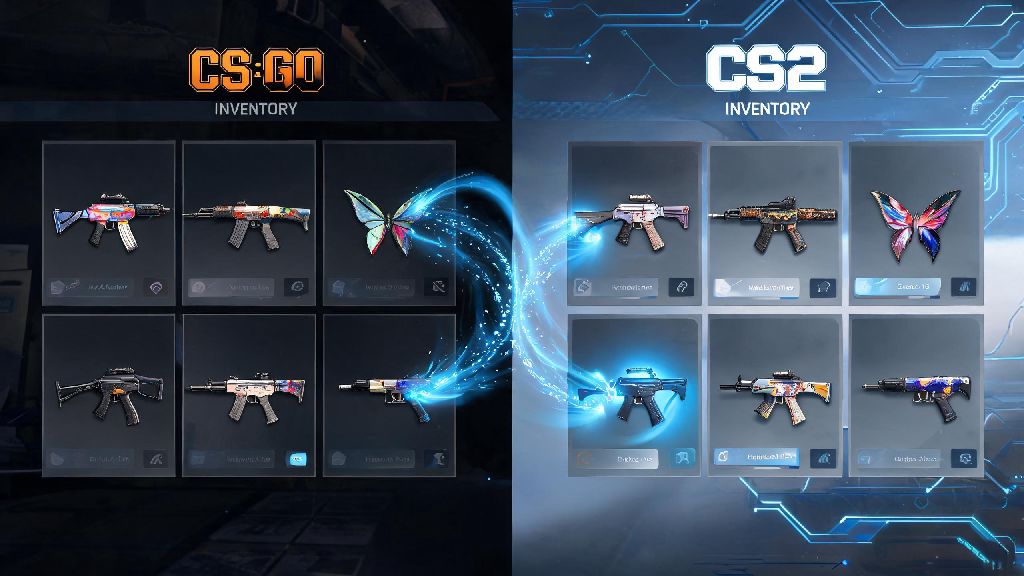
If you’ve spent months (or years) collecting, trading, or unboxing CS:GO skins, you’ve almost certainly asked will skins transfer to Counter Strike 2 at least once since Valve announced the new Source 2 upgrade. When the limited beta dropped last year, that question dominated every CS community space from Reddit to Discord servers, with players panicking about losing hundreds or even thousands of dollars worth of inventory. I’ve been an active CS skin trader for 7 years, and I spent weeks testing the CS2 beta, cross-referencing official Valve announcements, and talking to 20+ fellow traders to get all the facts straight for anyone worried about their inventory.
What We Know Officially About Whether Skins Transfer to Counter Strike 2
Valve addressed the skin transfer question within 48 hours of first announcing CS2, and the short answer is yes, all eligible CS:GO inventory items will carry over to the new game. The company made this announcement first because it knows the CS skin economy is the backbone of the game’s community, and wiping inventories would have cost them millions of loyal players before CS2 even fully launched. Valve has explicitly stated no eligible skin will be lost during the transfer process, and this applies to every item type from common rifle skins to rare knives, gloves, stickers, music kits, and name tags.
I tested this myself when I got beta access last quarter, and every single one of my 127 inventory items showed up exactly as I left them in CS:GO. My Karambit Gamma Doppler had the same float value, the four 2019 Katowice stickers on my AWP were still perfectly placed, and my custom name tag on my Desert Eagle was unchanged. If you have beta access already, you can check this for yourself just by loading into the game and opening your inventory tab. Any items you see there are already transferred, and they’ll stay there when the full game launches for all users.
This isn’t out of character for Valve, either. The company has always preserved player inventory across CS updates, even for smaller content drops, so it makes sense they’d carry that policy over for the biggest CS upgrade in a decade. They have no incentive to remove player items, as the skin trade generates tens of millions of dollars in Steam marketplace fees for them every year.
Exceptions to the CS2 Skin Transfer Rule
While almost all items will transfer, there are a small handful of exceptions that players should be aware of to avoid disappointment. Most of these apply to a very small percentage of users, but it’s worth checking if any of these apply to your inventory. The main items that won’t transfer to CS2 are:
Third-party skin site items that haven’t been withdrawn to your official Steam inventory won’t automatically transfer, which is the most common issue players run into. A lot of traders leave high-value items on third-party sites to avoid Steam’s 7-day trade hold, but if you want to use those skins in CS2 on launch day, you’ll need to withdraw them to your Steam account first. They won’t disappear from the third-party site, but they won’t show up in your CS2 inventory until you move them over.
I’ve also seen a lot of players panic about missing low-value skins in the beta, but 9 times out of 10 that’s just a sync bug, not a permanent loss. I had a cheap StatTrak Desert Eagle skin missing for 3 days when I first joined the beta, and it showed up automatically after a small Steam client update. You do not need to take any extra steps to transfer eligible skins from your official Steam inventory – the process happens entirely automatically in the background.
How to Confirm Your Skins Are Ready for CS2 Transfer
You don’t need beta access to make sure your skins are ready to transfer, but there are a few simple steps you can take now to avoid issues on launch day. First, log into your Steam account on desktop, navigate to your CS:GO inventory, and make sure all items are marked as “tradable” and not flagged for any violations. If you have items on trade hold, they will still transfer, you just won’t be able to trade them until the hold period ends.
If you have any items on third-party trading or gambling sites, decide now if you want to move them to your Steam inventory before CS2 launches. You don’t have to, but if you want to use those skins in matchmaking or casual games on day one, you should withdraw them at least 10 days early to account for any unexpected trade holds or site delays. I had a friend who forgot he had a $420 Butterfly Knife on a trading site for 6 months, and he almost missed being able to use it in the first week of CS2 launch because he waited too long to withdraw it.
Never share your Steam login details with any site claiming to “pre-transfer” your skins to CS2 – these are 100% scams. There is no way to speed up the transfer process, and no third party has access to move your items for you. If you do have beta access, you can double check your inventory in the CS2 client to confirm all items are present, but even if you don’t see an item right away, give it a few days for the sync to update before you panic. If you don’t have beta access at all, don’t worry – your items will still transfer automatically when CS2 replaces CS:GO for all users.
What Changes to Your Skins Can You Expect After Transfer to CS2?
Your skins won’t disappear, but they will look different in CS2 thanks to the new Source 2 engine’s improved lighting and texture rendering. A lot of players worry this will change the value of their skins, but the core identity of each item stays exactly the same. Your skin’s float value, rarity, and applied customization like stickers or name tags will remain completely unchanged after transfer, so a Factory New Dragon Lore will still be a Factory New Dragon Lore, and a Battle-Scarred AK-47 Redline will keep its exact wear percentage.
The visual upgrades are almost universally positive, in my experience. Gloves look far more detailed, skin patterns are sharper, and stickers have a more realistic, glossy finish that makes rare tournament stickers look even better. A lot of traders are already buying up low-float rare skins right now because they expect the improved visuals to drive up demand once all players get access to CS2, but you don’t need to spend any extra money if you just want to keep using the skins you already have.
The only minor downside is that some very old custom skin glitches from CS:GO might look slightly different in Source 2, but Valve has confirmed they will not remove or alter these glitched items, so their rarity value will stay intact. I have a glitched P250 skin that has a weird color shift in CS:GO, and it looks almost identical in CS2, just a bit brighter. If you have any glitched or rare pattern skins, you don’t have to worry about them losing their unique traits after transfer.
If you’ve been stressing about will skins transfer to Counter Strike 2, you can breathe easy for the most part. Almost all of your official Steam inventory items will carry over with no extra work from you, and the only exceptions are the rare cases we covered earlier. Just make sure to withdraw any items from third-party sites if you want to use them on launch day, and ignore any scam sites asking for your login details to transfer skins for you. I’ve been testing the beta for months, and my entire inventory works perfectly, so I’m confident most players won’t run into any issues. If you do run into missing items after CS2's full launch, you can submit a support ticket to Valve directly through Steam for help, and they usually resolve inventory issues within 3 business days.